• Make Over Arena

Local Selling Sites on Facebook - Local selling Groups Near Me

Know more about what Facebook store means. Selling products online is trending in the world we live in today as we are in the computer age....

Showing posts with label Lists. Show all posts

How to Hide People, Pages and Lists You Follow on Facebook

 Lists, Pages, People     No comments   

As you know, by default, Facebook keeps people, pages and list you follow on FB public and visible to every other user but you've got the choice of hiding it from other Facebook friends. Let's see how to hide pages, list and people you follow on Facebook.

See: How to hide and unhide a Facebook Post


How to Hide People, Pages and Lists You Follow on Facebook


Users now have full control on almost everything that appears on their profile for example: status, photos, albums and so on. Users also has the control of how they want to share their contents for an example: share with everyone, friends, friends of friends, groups and so on. Users can also manually hide a status from specific set of persons.

If you don’t want public visitors to your Facebook profile to see lists, pages and people you, then you just have to hide it from them.

See: How to Hide Your Facebook Friend List from Friends and Others


And seeing common friends, other friends usually accept the friend request. It’s kind of embarrassing when your female friend informs you that some mutual friend of yours has sent her a friend request.

It’s good you keep pages, list and people you follow private to only you and hidden from public users.
How to Hide People, Pages and Lists You Follow on Facebook

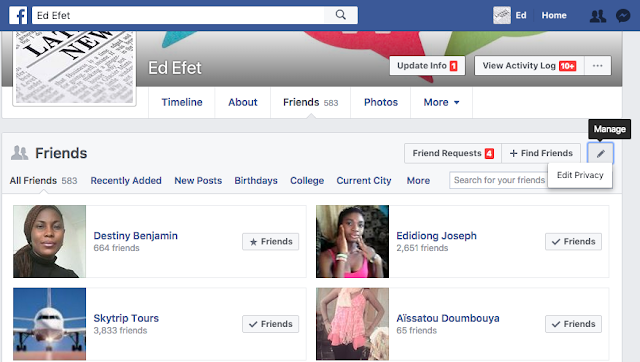
By default, everyone can see the Friends section of your profile. To adjust who can see your Friends section:
Go to your profile
Click Following below your cover photo
Click at the top of the page and select Edit Privacy from the dropdown menu


Hide Facebook Friend List from Friends and Others


Select an audience (ex: Friends, Public) to choose who you share your friend list with on your profile.


How to Hide People, Pages and Lists You Follow on Facebook


From here you can control who can see your pages and people you follow and who can’t. I keep mine visible to only me.

Conclusion

Keeping your followed Facebook pages, list and people visible to other people is totally a thing of choice, but I prefer keeping mine hidden and private to only for my own privacy.
Read More
  • Share This:  
  •  Facebook
  •  Twitter
  •  Google+
  •  Stumble
  •  Digg

How to Hide People, Pages and Lists You Follow on Facebook

 Lists, Pages, People     No comments   

As you know, by default, Facebook keeps people, pages and list you follow on FB public and visible to every other user but you've got the choice of hiding it from other Facebook friends. Let's see how to hide pages, list and people you follow on Facebook.

See: How to hide and unhide a Facebook Post


How to Hide People, Pages and Lists You Follow on Facebook


Users now have full control on almost everything that appears on their profile for example: status, photos, albums and so on. Users also has the control of how they want to share their contents for an example: share with everyone, friends, friends of friends, groups and so on. Users can also manually hide a status from specific set of persons.

If you don’t want public visitors to your Facebook profile to see lists, pages and people you, then you just have to hide it from them.

See: How to Hide Your Facebook Friend List from Friends and Others


And seeing common friends, other friends usually accept the friend request. It’s kind of embarrassing when your female friend informs you that some mutual friend of yours has sent her a friend request.

It’s good you keep pages, list and people you follow private to only you and hidden from public users.

How to Hide People, Pages and Lists You Follow on Facebook

By default, everyone can see the Friends section of your profile. To adjust who can see your Friends section:
Go to your profile
Click Following below your cover photo
Click at the top of the page and select Edit Privacy from the dropdown menu


Hide Facebook Friend List from Friends and Others


Select an audience (ex: Friends, Public) to choose who you share your friend list with on your profile.


How to Hide People, Pages and Lists You Follow on Facebook


From here you can control who can see your pages and people you follow and who can’t. I keep mine visible to only me.

Conclusion

Keeping your followed Facebook pages, list and people visible to other people is totally a thing of choice, but I prefer keeping mine hidden and private to only for my own privacy.
Read More
  • Share This:  
  •  Facebook
  •  Twitter
  •  Google+
  •  Stumble
  •  Digg
Older Posts Home

Blog Archive

  • ▼  2019 (494)
    • ▼  July (5)
      • Local Selling Sites on Facebook - Local selling Gr...
      • Facebook Store – Facebook Buy an Sell – Facebook M...
      • Marketplace App For Facebook – Facebook Selling Ap...
      • Facebook Marketplace Buy And Sell | Join Marketpla...
      • Facebook Marketplace How to Sell – How to Sell Stu...
    • ►  February (359)
    • ►  January (130)
  • ►  2018 (2136)
    • ►  November (83)
    • ►  October (151)
    • ►  June (300)
    • ►  May (1162)
    • ►  April (279)
    • ►  March (161)
  • ►  2016 (48)
    • ►  December (1)
    • ►  July (41)
    • ►  June (6)

Contact Us

Name

Email *

Message *

Search

Populars

  • Marketplace App For Facebook – Facebook Selling App Download | How To Download Marketplace App
    Marketplace App For Facebook – Facebook Selling App Download | How To Download Marketplace App The Marketplace removes the drudgery a...
  • How to Change Name on Facebook Profile
    welcome to our How to Change Name on Facebook Profile post for 2018. How to Change Name on Facebook Profile – Facebook has actually ...
  • How to Open another Facebook account using Chrome
    How to Open another Facebook account using Chrome: We shall see how to use multiple account in Facebook, twitter and other. This article is...
  • View Your Blocked Facebook List and Unblock Friends
    Learn How To View Blocked List  on Facebook and Unblock Friends: Your Facebook account is entirely yours and you can choose whatever settin...
  • View Your Blocked Facebook List and Unblock Friends
    Learn How To View Blocked List  on Facebook and Unblock Friends: Your Facebook account is entirely yours and you can choose whatever settin...
  • How to Deactivate My Facebook Account 2018 Guide
    Who says you cannot deactivate your Facebook temporarily or better still delete Facebook account permanently? Even though we agree that Fac...
  • How to Check Facebook Email
    This question is most renowned as well as there are so several individuals available that are asking this question. Among our viewers has ac...
  • Free Download Facebook Messenger
    Facebook is no new term for any of us, and you have been using this social system considering that years. Facebook is the largest social pla...
  • I Want to Verify My Facebook Account
    I Want to Verify My Facebook Account Have you been asking yourself I Want To Verify My Facebook Account? You understand, that check mark tha...
  • How do I pin a post to the top of my Pages timeline on Facebook?
    How do I pin a post to the top of my Facebook Page's timeline? - You may have been hearing of "pinning post on Facebook" but y...

Copyright © MoneyOmetrics