• Make Over Arena

Local Selling Sites on Facebook - Local selling Groups Near Me

Know more about what Facebook store means. Selling products online is trending in the world we live in today as we are in the computer age....

How to make your Facebook private

 Facebook, Make Facebook private     No comments   

Facebook is a wonderful tool you can use in keeping in touch with old friends, family and anyone else you care to talk to. But that digital freedom comes at a cost: your privacy. Fortunately there are ways to make sure that only the people you want to see your Facebook profile can – unless of course somebody knows your password.
The steps to making your Facebook private is actually relatively easy once you familiarize yourself with the increasingly bloated user-interface. So where do you begin? Read on.

1. Privacy Shortcuts
There are two easy ways to get to the necessary privacy settings of your Facebook profile. In the top right, you will see a button to the right of your name – it has a padlock sign on it and three horizontal lines. Press it and then select 'See More Settings' at the bottom.
How to make your Facebook private
On the other hand, you can click the little cog settings button located in the very top right next to the aforementioned Privacy Short button and then select "Settings" from the drop-down menu. The end result is exactly the same in either case. Now you can set your privacy to your standard.

2. Who can see my stuff?
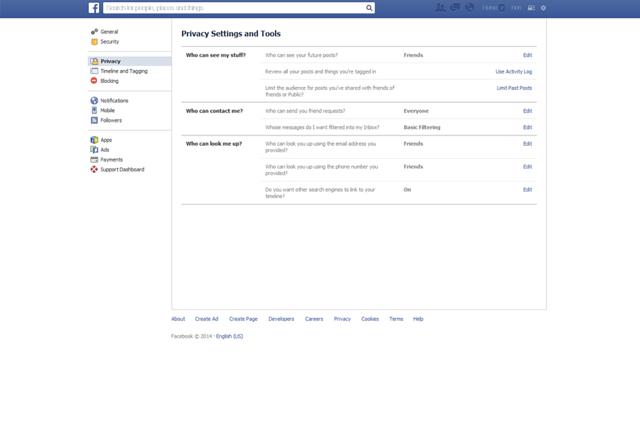
Under the Privacy Settings and Tools heading you will see three questions in bold letters: "Who can see my stuff?", "Who can contact me?" and "Who can look me up?". Let's start with the first heading on the list.
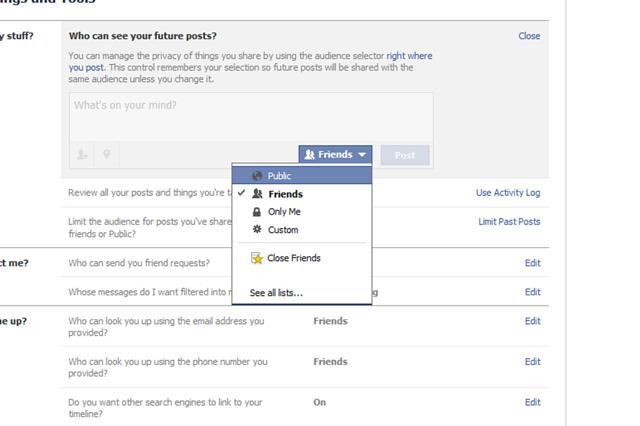
i) "Who can see your future posts?": click the edit button on the far right. Select who you want to see your future Facebook posts from the drop-down menu. Naturally, public will be the opposite of private so set it to "friends" if you only want Facebook friends to see them.
How to make your Facebook private
Also you can select "only me" if you want only yourself to see what you post, or click "Custom". Custom allows you to select specific options including "Don't share with", meaning you can choose a particular Facebook friend or friends you no longer wish to share posts with. You can also block lists you are a part of, such as a school network.
If there is a post you want to limit the visibility of, the "Review all your posts and things you're tagged in" setting located below allows you to do just that. Hit the "activity log" button and use the pen edit button to delete specific entries you no longer wish to share.

ii) Who can contact me?
If you want to stop getting messages in your inbox from people who aren't your Facebook friends, you can use the message-filtering option under "Who can contact me?". Switch it from basic filtering to strict filtering to only see messages from friends in your inbox. Doing so will keep random messages from strangers at bay.

iii) Who can look me up?
Maybe you want to limit who can look up your Facebook profile. The "Who can look me up?" options allows you to set your privacy to your preference in this regard. With friends enabled, only your friends can look you up using your email address.
The same options can be said for your phone number i.e., if you entered one into Facebook. Again, you can select the friends option for the highest level of privacy.

Finally, you can choose whether search engines such as Bing and Google can be linked to your Timeline. A simple tick box option is all it will take to really shut your Facebook profile off from the world wide web. As Facebook states, this option can take a while to come into effect so don't panic if it seems like you are still coming up on search engines.

Do you want ultimate privacy?
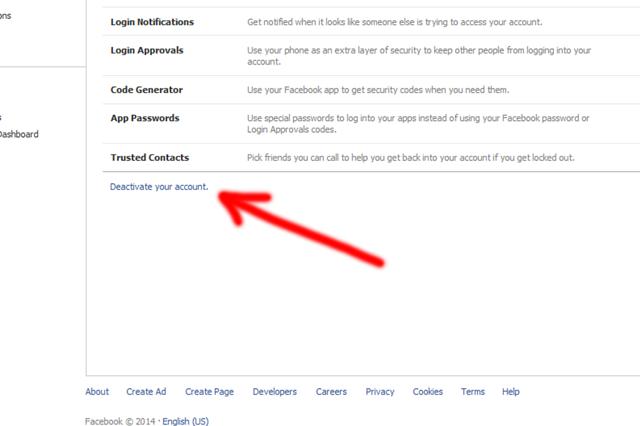
To really ensure your privacy, there is always the option of leaving Facebook entirely. Of course, this is a drastic course of action but something like online bullying could force your hand (in which case, you should seek support). Or maybe you are just tired of sharing everything so publicly.
How to make your Facebook private
  • Share This:  
  •  Facebook
  •  Twitter
  •  Google+
  •  Stumble
  •  Digg
Email ThisBlogThis!Share to XShare to Facebook
Newer Post Older Post Home

0 comments:

Post a Comment

Blog Archive

  • ►  2019 (494)
    • ►  July (5)
    • ►  February (359)
    • ►  January (130)
  • ▼  2018 (2136)
    • ►  November (83)
    • ►  October (151)
    • ►  June (300)
    • ▼  May (1162)
      • How to Deactivate Facebook Account Permanently Imm...
      • How can I deactivate Facebook Account on Mobile Phone
      • Facebook Sign In New Account - Mobile Login Facebook
      • How to Hide Your Facebook Friend List from Friends...
      • How to See Blocked Friend List on Facebook
      • Deactivate | Delete Accounts Facebook
      • Truth About Facebook Follow Me Hoax
      • How to Deactivate Your Facebook Account - Simplest...
      • How do I Unblock Someone on Facebook
      • Messenger App Settings
      • Block My Facebook Account Temporarily
      • How to Delete a Facebook Account for Good
      • How to Follow Someone on Facebook Without Them Kno...
      • Following Me Facebook Hoax
      • How to Block Someone From Following You on Faceboo...
      • How To Change Facebook Password
      • What Does It Mean to Poke someone On Facebook
      • How to Poke Someone on Facebook
      • How To Change Name On Facebook.
      • Following On Facebook
      • Facebook Lite App For Microsoft Lumia Phones | FB APP
      • How to Delete Facebook Permanently Guide
      • Facebook follow me hoax really making rounds again
      • Facebook People You May Know Viewed
      • How to Log out of My Facebook Account?
      • Facebook App for iPhone
      • Change Your Facebook Url
      • Apps to See who Looks at Your Facebook Profile 2018
      • How Do I Unblock A Facebook Friend 2018
      • How do I Reactivate Facebook Account
      • How Can I Change Cover Photo on Facebook
      • How to Reset Password on Facebook
      • How to block someone on Facebook Messenger
      • How To Delete A Facebook Page
      • How to See Who Views Your Facebook Profile
      • Download Facebook Messenger - Facebook Login
      • FB App - Download Facebook Lite App On Android Plu...
      • How to uninstall and install Fb
      • How to create a private event on Facebook on iPhone
      • How to poke somebody that poked you on Facebook
      • Delete my fb account right now - Deactivate Facebo...
      • How to Create A Facebook Group
      • How do you delete photos of you on Facebook?
      • How To Turn On Followers On Facebook
      • Change Profile Name on Facebook Page
      • How to delete videos from Facebook
      • Who Is Viewing My Facebook Page
      • Who Unfriended Me On Facebook App
      • Following Me Facebook Latest Hoax
      • How to Keep Blocked Friend List on Facebook
      • Can You Retrieve Deleted Messages On Facebook
      • Login www facebook sign up
      • Facebook App Login
      • Facebook Business Pages
      • How to Block Someone on Facebook?
      • Blocked Facebook Friend List
      • View Facebook Blocked List
      • How to Find who Has Blocked Me On Facebook
      • Blocking People on Facebook
      • Facebook Login | Sign Up Page Download
      • Deactivating Deleting Facebook Accounts
      • How Do You Change Your Last Name On Facebook
      • Report Facebook Account
      • Who Views Your Facebook
      • View My Blocked Facebook List and Unblock Friends ...
      • How To Delete Facebook Account Permanently Right Now
      • How To See my Blocked Facebook Friend List
      • Is Facebook following me post legit or a hoax? Fol...
      • How to Make Business Page on Facebook
      • Delete Your Faceɓook account Permanently | Delete ...
      • How can I see who follows me on Facebook
      • Facebook login home facebook login page
      • How can I tell who follows me on Facebook
      • How to Insert Facebook Icon for Website?
      • How to See My Facebook Profile Viewers 2018
      • How to Follow Someone on Facebook Without Them Kno...
      • How Do You Deactivate A Facebook Account
      • How To View Blocked List On Facebook
      • Facebook Sign Up | Login Page
      • How to Erase Facebook Notifications
      • Facebook Login Google
      • Change or Reset Facebook Password
      • Welcome to Facebook Login Sign Up
      • How can I delete a facebook page on my android phone
      • Merge Pages In Facebook
      • How to deactivate fb account now
      • Changing Facebook Password
      • How Do I Change My Facebook User Name
      • Facebook Com Change Profile Picture
      • How to deactivate my Facebook account step by step
      • Sign In Facebook – Quick Facebook Sign in method
      • Login facebook account- Facebook login mobile app
      • How to Post Animated Gif On Facebook
      • How to Catch A Facebook Stalker
      • How Do You Save Facebook Videos
      • Apps for Facebook Messenger
      • How to Log Into Instagram with Facebook
      • How Do I Change Facebook Back to English
      • How to Deactivate your Facebook Account
      • Facebook Messenger Delete
    • ►  April (279)
    • ►  March (161)
  • ►  2016 (48)
    • ►  December (1)
    • ►  July (41)
    • ►  June (6)

Contact Us

Name

Email *

Message *

Search

Populars

  • I Want to Verify My Facebook Account
    I Want to Verify My Facebook Account Have you been asking yourself I Want To Verify My Facebook Account? You understand, that check mark tha...
  • How to Check Facebook Email
    This question is most renowned as well as there are so several individuals available that are asking this question. Among our viewers has ac...
  • Deactivate or Delete Facebook now
    Do you know that you can take a break from Facebook? Simply deactivate or delete your account. Here's what to do: TO DEACTIVATE: On Your...
  • Delete Facebook Account
    Delete Facebook Account : So you've gotten to the bridge where you have to say a farewell to everything concerning Facebook huh? If you...
  • Health Savings Account - What you should know about HSA
    What is a Health Savings Account? A Health Savings Account (HSA) is a tax-advantaged medical savings account you can contribute to and d...
  • How do I pin a post to the top of my Pages timeline on Facebook?
    How do I pin a post to the top of my Facebook Page's timeline? - You may have been hearing of "pinning post on Facebook" but y...
  • Free Download Facebook Messenger
    Facebook is no new term for any of us, and you have been using this social system considering that years. Facebook is the largest social pla...
  • Facebook now testing paywalls and subscriptions for Instant Articles
    Facebook now testing paywalls and subscriptions for Instant Articles: A few months ago it was reported that Facebook may begin testing paywa...
  • How to Deactivate Facebook Account Temporarily With Pictures
    Learn How to Deactivate Facebook Account Temporarily With Pictures - Facebook allows users to delete and deactivate their account whenever...
  • Financial Tips For Young Adults
    Unfortunately, personal finance has not yet become a required subject in high school or college, so you might be fairly clueless about how ...

Copyright © MoneyOmetrics